AI won't fix a messy support operation. It just makes the mess faster.
AI in support only works on top of good data, knowledge and handoffs. Find your gaps free in five minutes, then fix them step by step. Independent help from a support operations manager, not a vendor selling seats.
-
Not started yet
Get ready before you switch AI on
18 questions, six areas, your three biggest gaps and what to do first.
Take the free assessment -
AI is live
See what your AI is really resolving
Add a ticket export and see which AI resolutions came back, topic by topic.
Check your AI resolutions free
Already know what needs fixing? The AI Support Playbook guides you through it stage by stage, for £79.

- 10 years at a B2B software company
- No vendor commissions
- Works with any help desk

Five tickets billed as resolved. Two came back, and one was never confirmed. The free checker finds the rest in your own export.
Support AI usually fails for one of four boring reasons
None of them is a tooling problem. They're support operations problems, and every one of them is fixable.
Ticket data nobody trusts
Categories are used inconsistently, so AI has little to learn from and nobody can say what customers contact you about most.
Knowledge that's out of date
AI answers confidently from old or contradictory articles. Wrong answers are usually a knowledge problem, not a model problem.
No baseline
Without before-and-after numbers, nobody can prove AI saved anything, and the budget is the first thing questioned.
The wrong first use case
Teams automate complex or risky tickets first. Starting with high-volume, low-risk, well-documented questions works far better.
- 91% of service leaders say executives are pushing them to implement AI. Gartner, 2026
- 50% of support leaders say AI hasn't significantly lowered their cost per ticket. Hiver, 2026
- 72% of service operations staff call data readiness a major blocker to AI. Salesforce, 2026
AI Support Playbook
Fix the foundations yourself, one stage at a time
A guided online journey through the six things AI in support depends on: ticket data, what counts as resolved, knowledge, rules for AI, handoffs and ownership. At each stage you build a real piece of your own operation. Most teams finish in two to four weeks.
- Not started: a realistic business case and a 90-day rollout plan with go/no-go points
- AI live but not delivering: a 30-day fix plan to measure what really holds, fix the causes and prove the change
- You finish with topic-by-topic decisions, an AI policy, a test set for your AI and a one-page update for leadership
£79 one-off · guided journey plus 11 editable templates
30-day money-back guarantee.
Is your AI's resolution rate real?
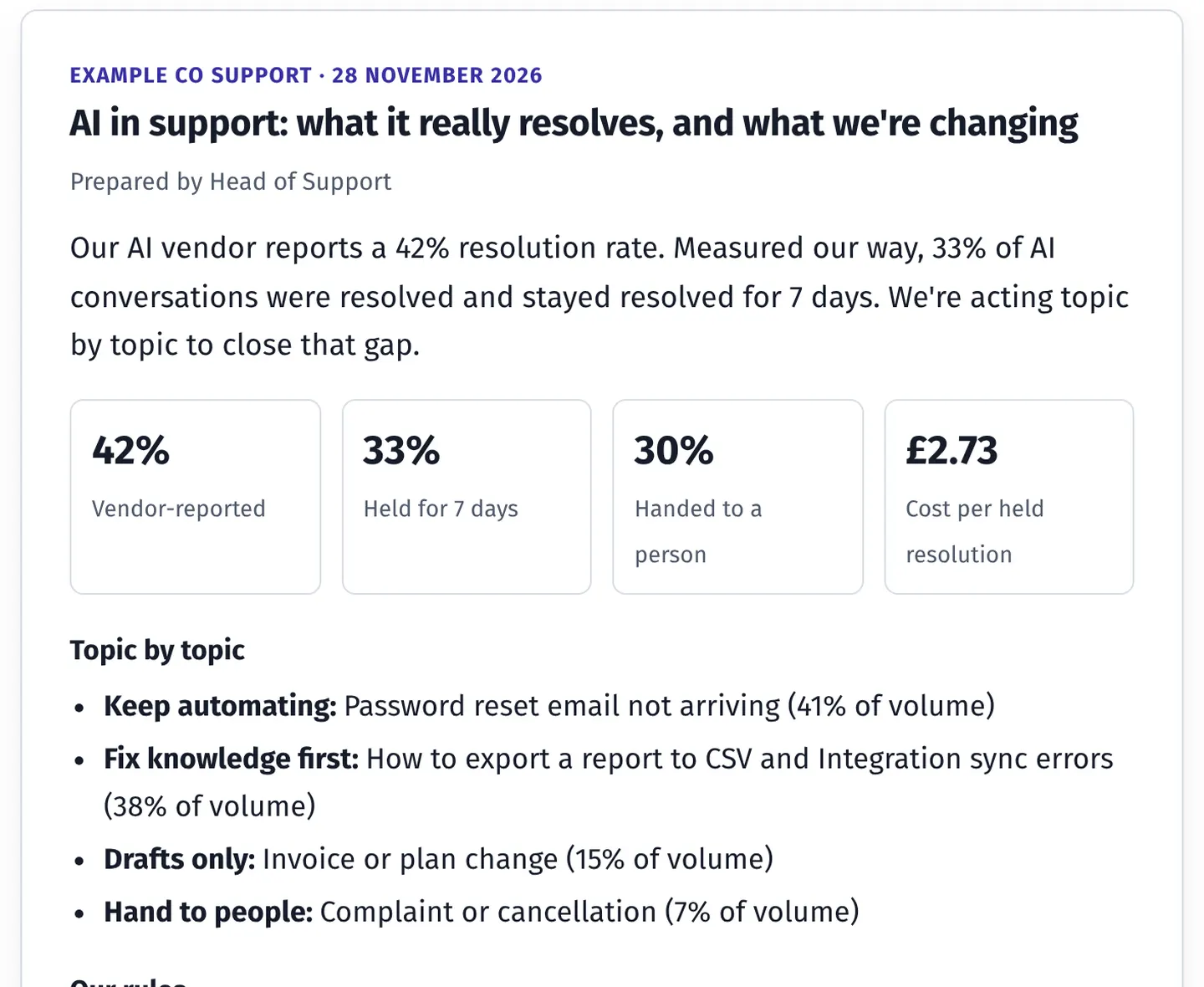
Most AI agents count a ticket as resolved when the customer stops replying. Add a ticket export and the free checker shows how many AI resolutions were reopened, came back within a week, or were never confirmed, topic by topic. Then download a one-page summary to take to your leadership team.
Runs in your browser. Your file isn't uploaded anywhere. Works with any help desk that exports CSV.
Renewing your AI contract soon? Use the free renewal checklist. Not using AI yet? The 5-minute readiness assessment scores your team instead.
174 of 1,046 AI resolutions didn't hold (17%)
Share of AI resolutions that came back, by topic.
How we work together
Start free. Each step only happens if the one before it was worth it.
Free assessment or checker
FreeScore your readiness in five minutes, or run your ticket export through the resolution checker if your AI is live.
AI Support Playbook
£79Fix the gaps yourself with a guided six-stage journey and 11 editable templates, whether you're about to start with AI or it's live and not delivering.
AI Support Health Check
£695, fixedI analyse your export and review a sample of AI answers against your help centre. You get topic-by-topic verdicts, the knowledge gaps behind wrong answers, and a prioritised plan your team can act on.
What's included · Sample report · Three founding places at £395
Monthly AI quality review
£450 a monthEach month I re-check your resolution rate, score a fresh sample of AI answers, and send a one-page report your leadership will actually read. Cancel any time.
You keep control of your tools: I deliver the analysis, the fixes to make and clear specs, and your team or vendor makes the changes.
Templates to run support well
Practical, editable templates built from real support work.
Free starter templates
Engineering handoff, escalation matrix, and a KPI dashboard with AI metrics.
Free
DownloadSupport Ops Toolkit
11 templates: SOPs, skills matrix, SLA tracker, runbook, RCA, AI-ready knowledge articles and more.
Free
Get the ToolkitAI Support Playbook
A guided six-stage journey plus 11 templates: 30-day AI fix plan, 90-day rollout plan, AI policy, QA scorecard, business case and more.
£79
See what's inside
Or try the free savings calculator to see what AI could realistically save your team.

Hi, I'm Chris Barber
I've spent around ten years in B2B software. I started as a software engineer and now run a technical support team, where I work to keep support smooth and effective for the team and our customers.
That means I've dealt with the messy parts first-hand: categories nobody uses, knowledge that lives in people's heads, AI answers that sound confident and are wrong, and leadership asking for savings before the basics are in place. My hands-on tool experience is ServiceNow and an in-house platform, and my engineering background means I'm comfortable digging into data and integrations.
I work from your exported data rather than inside your admin screens, so it doesn't matter which help desk you use. I don't resell software or take commissions from vendors.
Questions
Where should I start?
If you haven't switched AI on yet, take the free assessment. If it's live, run your export through the free checker. Both show your biggest gaps. The AI Support Playbook (£79) then guides you through fixing them, and the Health Check is there if you'd rather I looked at your data for you.
What do I get with the AI Support Playbook?
A guided online journey in six stages, plus 11 editable Word and Excel templates. You finish with topic-by-topic decisions, an AI policy, a test set for your AI and a one-page update for leadership. Most teams work through it in two to four weeks. If it isn't useful, email me within 30 days for a full refund.
Which help desks do you work with?
Any that can export tickets as CSV, which is all the main ones. My own hands-on experience is with ServiceNow and an in-house platform. The analysis doesn't depend on the tool, and where a fix needs configuring, you get a written spec for your admin or vendor. If a job needs a specialist in your particular tool, I'll tell you.
Who is this for?
B2B software companies with roughly 5–50 people in support, usually without a dedicated support operations role, who are about to start with AI, or have switched on an AI agent that isn't delivering yet. I have a particular focus on technical support teams, where AI resolutions hold least often.
How much of my team's time will it take?
For a Health Check: a 20-minute scoping call, about an hour to export and anonymise your tickets, and a 45-minute walkthrough of the results.
How do you handle our customers' data?
The free checker runs entirely in your browser, so nothing is uploaded. For a Health Check, I sign a data processing agreement first, work from an export with customer details replaced by IDs, and delete it 30 days after the report. I don't need access to your systems.
Do you sell or recommend particular AI tools?
No. I'm paid by you, not by vendors. Most teams already pay for AI features they haven't set up properly, and that's usually the place to start.
Get AI in support right, stage by stage
The AI Support Playbook: a guided six-stage journey and 11 templates, £79 one-off, with a 30-day money-back guarantee. Not sure yet? Find your biggest gaps free in five minutes first.