Support-to-engineering handoff template
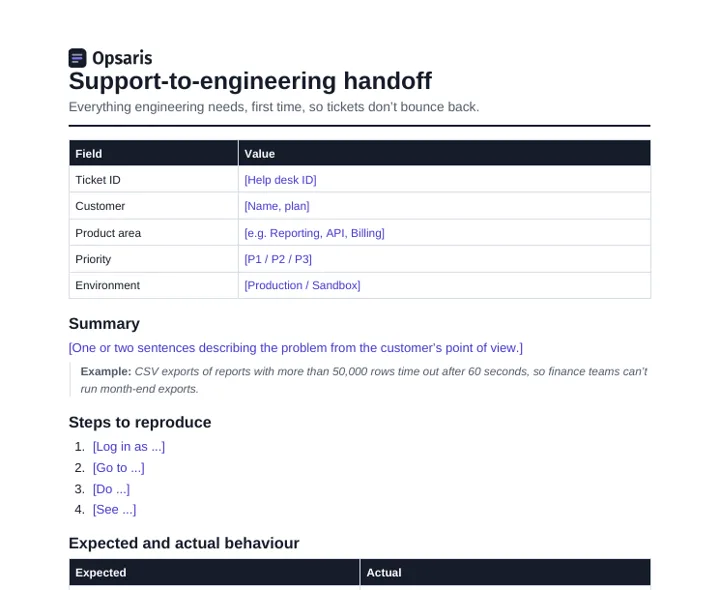
A free Word template for escalating bugs to engineering with everything they need first time: a clear summary, steps to reproduce, evidence, customer impact and a specific request. It includes checks for handoffs drafted by AI.
Word document, 2 pages. No sign-up. Free to use and adapt inside your organisation.
Why handoffs bounce back
Most escalations that come back to support with "can't reproduce" or "need more info" are missing the same few things: exact steps, which customers are affected, and evidence such as request IDs or screenshots. Each round trip adds days for the customer. A consistent handoff format fixes most of this.
What's in the template
- Header fields: ticket ID, customer and plan, product area, priority and environment.
- Summary from the customer's point of view, with a worked example.
- Steps to reproduce and expected versus actual behaviour.
- What support has already checked, so engineering doesn't repeat it.
- Evidence: screenshots, request or log IDs, and linked tickets.
- Impact: how many customers, the business effect and any workaround.
- What you're asking for, with a reason and a date.
- AI-assisted handoffs: whether AI drafted it, who checked it, and whether a duplicate check was done.
Using AI to draft handoffs, safely
AI is good at turning a long ticket thread into a structured handoff. It's also good at sounding certain about steps it has guessed. Use it to draft, then have the agent check the steps to reproduce and the impact before sending. The template's AI section makes that check visible to engineering.
Making it stick
- Agree it with engineering first. Ask which fields they actually need, and drop any they don't.
- Turn it into a macro or form in your help desk or issue tracker, so it's quicker to use than to skip.
- Review bounced tickets monthly. Every handoff returned for more information shows which field to strengthen.
Questions
Does this replace our Jira or Linear bug template?
It's designed to sit alongside it. Paste the completed handoff into your engineering ticket, or copy the fields into your issue tracker's template.
How long should a handoff take to write?
Usually five to ten minutes once it's familiar. That's far less than the time lost to a ticket bouncing back and forth.
Want the rest of the toolkit?
This template is one of 11 in the Support Ops Toolkit, free with your email address. Already using an AI agent? The free resolution checker shows how many of its resolutions really held.
Not sure where your gaps are? Take the free 5-minute assessment.
More free templates
Written by Chris Barber, who runs a technical support team at a B2B software company.